How to Get More Visitors to Your Website
How can you get more visitors to your website? What can you do to stimulate traffic? Here's a checklist of over 30 items you need to consider. Many of these you're probably doing already; others you meant to do and forgot about; still others you've never heard of. Of course, a great deal has been written about this. While we're not breaking any new ground here, we've tried to summarize some of the most important techniques. Search Engine StrategiesPerhaps the most important -- and inexpensive -- strategy is to rank high for your preferred words on the main search engines in "organic" or "natural" searches (as opposed to paid ads). Search engines send robot "spiders" to index the content on your webpage, so let's begin with steps to prepare your webpages for optimal indexing. The idea here is not to trick the search engines, but to leave them abundant clues as to what your webpage is about. 1. Write a Page Title. Write a descriptive title for each page of 5 to 8 words. Remove as many "filler" words from
the title, such as "the," "and," etc. This page title will appear hyperlinked on the search engines when your page
is found. Entice searchers to click on the title by making it interesting. Make sure your main keyword is in
the title. Plan to use some descriptive keywords along with your business name on your home page. If you specialize in silver bullets and that's what people will be searching for, don't just use your company name "Acme Ammunition, Inc." use "Silver and Platinum Bullets -- Acme Ammunition, Inc." The words people are most likely to search on should appear first in the title (called "keyword prominence"). Remember, this title is nearly your entire identity on the search engines. The more people see that interests them in the blue hyperlinked words on the search engine, the more likely they are to click on the link. 2. Write a Description and Keyword META
Tag. The description should be a sentence or two describing the
content of the webpage, using the main keywords and key phrases on this page. If you include keywords that aren't
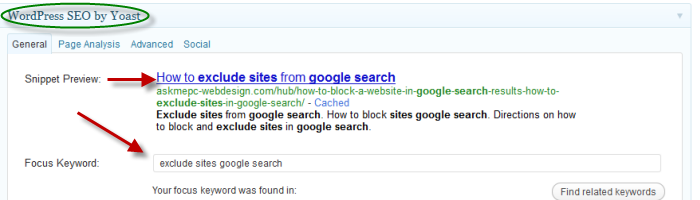
used on the webpage, you could hurt yourself. This plugin actually shows you what your title and the excerpt will look like in google search results before you publish the page.
When I prepare a webpage, I write the article first, then write a description of the content in that article in a sentence or two, using each of the important keywords and keyphrases included in the article. This goes into the description META tag. Then for the keywords META tag, I strip out the common words, leaving just the meaty words and phrases. The keywords META tag is no longer used for ranking by Google, but it is currently used by Yahoo, so I'm leaving it in. Who knows when more search engines will consider it important again? Every webpage in your site should have a title, and META description tag. 3. Include Your Keywords in Header Tags H1, H2, H3. Search engines consider words that appear in the page headline and sub heads to be important to the page, so make sure your desired keywords and phrases appear in one or two header tags. Don't expect the search engine to parse your Cascading Style Sheet (CSS) to figure out which are the headlines -- it won't. Instead, use keywords in the H1, H2, and H3 tags to provide clues to the search engine. (Note: Some designers no longer use the H1, H2 tags. That's a mistake. Make sure your designer defines these tags in the CSS rather than creating headline tags with other names.) 4. Make Sure Your Keywords Are in the First Paragraph of Your Body Text. Search engines expect that your first paragraph will contain the important keywords for the document -- where most people write an introduction to the content of the page. You don't want to just artificially stuff keywords here, however. More is not better. Google might expect a keyword density in the entire body text area of maybe 1.5% to 2% for a word that should rank high, so don't overdo it. Other places you might consider including keywords would be in ALT tags and perhaps COMMENT tags, though few search engines give these much if any weight. 5. Use Keywords in Hyperlinks. Search engines are looking for clues to the focus of your page. When they see words hyperlinked in your body text, they consider these potentially important, so hyperlink your important keywords and keyphrases. To emphasize it even more, the webpage you are linking to could have a page name with the keyword or keyphrase, such as blue-widget.htm -- another clue for the search engine. 6. Make Your Navigation System Search Engine
Friendly. 7. Develop Several Pages Focused on Particular Keywords. Search Engine Optimization (SEO) specialists no longer recommend using external doorway or gateway pages, since nearly duplicate webpages might get you penalized. Rather, develop several webpages on your site, each of which is focused on a different keyword or keyphrase. For example, instead of listing all your services on a single webpage, try developing a separate webpage for each. These pages will rank higher for their keywords since they contain targeted rather than general content. You can't fully optimize all the webpages in your site, but these focused-content webpages you'll want to spend lots of time tweaking to improve their rank. 8. Submit Your Webpage URL to Search
Engines. This is really obsolute now. 9. Fine-tune with Search Engine
Optimization. Now fine-tune your focused-content pages (described in point
7), and perhaps your home page, by making minor adjustments to help them rank
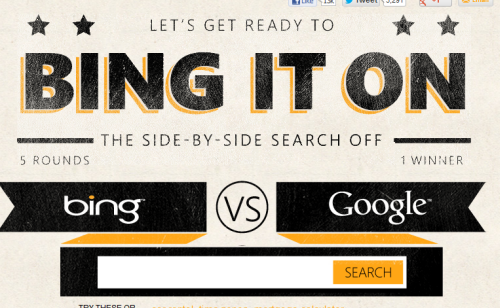
high. A really fun tool that Bing just
came out with is called "Bing it On".
10. Promote Your Local Business on the Internet. These days many people search for local businesses on the Internet. To make sure they find you include on every page of your website the street address, zip code, phone number, and the five or 10 other local community place names your business serves. If you can, include place names in the title tag, too. When you seek links to your site (see below), a local business should get links from local businesses with place names in the communities you serve and complementary businesses in your industry nationwide. List your website on Yelp, Google Profiles, and all the social media websites. Links to your site from other sites bring additional traffic. But since Google and other major search engines consider the number of incoming links to your website ("link popularity") as an important factor in ranking, more links will help you rank higher in the search engines, too. Google has introduced a 10-point scale called PageRank (10 is the highest rank) to indicate the quantity and quality of incoming links. All links, however, are not created equal. Links from popular information hubs will help your site rank higher than those from low traffic sites. This is one of the many reasons being involved in some good forums online is very helpful. You can create a profile and link it to your website and that link counts in google. Also leaving comments on popular websites with a link is good. Not comment spamming, but real comments that are relavant to your website and business. 11. Submit Your Site to Key
Directories, since a link from a directory will help your ranking -- and
get you traffic. You can try to list your site in the free Open Directory
Project (www.dmoz.com), overseen by overworked volunteer
human editors. This hierarchical directory provides content feeds to all the major search engines. Plus it provides
a link to your site from an information hub that Google deems important. But don't be impatient and resubmit or
you'll go to the end of the queue. Yahoo! Directory is another directory to consider if you want
to be in a large directory. 12. Submit Your Site to Industry Sites and Specialized Directories. You may find some directories focused on particular industries, such as education or finance. You probably belong to various trade associations that feature member sites. Ask for a link. Even if you have to pay something for a link, it may help boost your PageRank. Beware of directories that solicit you for "upgraded listings." Unless a directory is widely used in your field, your premium ad won't help -- but the link itself will help boost your PageRank and hence your search engine ranking. Marginal directories come and go very quickly, making it hard to keep up. Don't try to be exhaustive here. 13. Request Reciprocal Links. Find complementary websites and request a reciprocal link to your site (especially to your free service, if you offer one). Develop an out-of-the way page where you put links to other sites -- so you don't send people out the back door as fast as you bring them in the front door. Your best results will be from sites that get a similar amount of traffic to your site. High-traffic site webmasters are too busy to answer your requests for a link and don't have anything to gain. Look for smaller sites that may have linking pages. One warning: Be sure to only link to complementary sites, no matter how often you are bombarded with requests to exchange links with a mortgage site that has nothing to do with yours. One way Google determines what your site is about is who you link to and who links to you. It's not just links, but quality links you seek. 14. Write Articles for Others to Use in their
Newsletters. You can dramatically increase 15. Begin a Business Blog. Want links to your site? Begin a business blog on your website, hosted on your own domain. If
you offer excellent content and regular industry comment, people are likely to link to it, increasing your site's
PageRank.If you have a blog on a third-party blog
site, occasionally find reasons to talk about and link to your own domain. The fastest and most simple to add a
blog to your current website is using WordPress. Many of my clients are now converting their HTML website over to
WordPress completely and using it as thier content management system. 16. Issue News Releases. Find newsworthy events and send news releases to print and Web periodicals in your industry. The links to your site in online news databases may remain for years and have some clout with link popularity. However, opening or redesigning a website is seldom newsworthy these days. You may want to use a Web news release service such as PR Web Issuing press releases is a traditional promotional strategy, but there are other traditional approaches that can help you as well. Traditional StrategiesJust because "old media" strategies aren't on the Internet doesn't mean they aren't effective. A mixed media approach can be very effective. 17. Include Your URL on Stationery, Cards, and Literature. This is a no-brainer that is sometimes overlooked. Make sure that all reprints of cards, stationery, brochures, and literature contain your company's URL. And see that your printer gets the URL syntax correct. In print, I recommend leaving off the http:// part and including only the www.domain.com portion. 18. Promote using traditional media. Don't discontinue print advertising that you've found effective. But be sure to include your URL in any display or classified ads you purchase in trade journals, newspapers, yellow pages, etc. View your website as an information adjunct to the ad. Use a two-step approach: (1) capture readers' attention with the ad, (2) then refer them to a URL where they can obtain more information and perhaps place an order. Look carefully at small display or classified ads in the back of narrowly-targeted magazines or trade periodicals. Sometimes these ads are more targeted, more effective, and less expensive than online advertising. Consider other traditional media to drive people to your site, such as direct mail, classifieds, post cards, etc. TV can be used to promote websites, especially in a local market. 19. Develop a Free Service. It's boring to invite people, "Come to our site and learn about our business." It's quite another to say "Use the free kitchen remodeling calculator available exclusively on our site." Make no mistake, it's expensive in time and energy to develop free resources. Make sure that your free service is closely related to what you are selling so the visitors you attract will be good prospects for your business. Give visitors multiple opportunities and links to cross over to the sales part of your site. E-Mail StrategiesDon't neglect e-mail as an important way to bring people to your website. Just don't spam. That is, don't send bulk unsolicited e-mails without permission to people with whom you have no relationship. I myself use AWeber and find it simple to use and effective. I use AWeber for my email program. I find AWeber easy to use, they have templates if you want to use those for your newslettter. They are very helpful and you can call them or use their help section. This is important to me because when I need help I want to be able to call a company and also not be charged extra for help. Here is a free trial sign up, so you can actually try it first before you commit.
Can You Have More Sales, Too? Helping over 102,000+ businesses like yours raise
profits and build customer relationships using AWeber's opt-in email marketing
software for over 10 years.
20. Install a "Signature" in your E-Mail Program to help potential customers get in touch with you. Most e-mail programs such as AOL, Netscape, and Outlook allow you to designate a "signature" to appear at the end of each message you send. Limit it to 6 to 8 lines: Company name, address, phone number, URL, e-mail address, and a one-phrase description of your unique business offering. Look for examples on e-mail messages sent to you. 21. Publish an E-Mail Newsletter. While it's a big commitment in time, publishing a monthly e-mail newsletter ("ezine") is one of the very best ways to keep in touch with your prospects, generate trust, develop brand awareness, and build future business. It also helps you collect e-mail addresses from those who visit your site but aren't yet ready to make a purchase. Ask for an e-mail address and first name so you can personalize the newsletter. You can distribute your newsletter using listservers such as:
If you would like more tips and recommendations and ongoing education, please sign up for
my newsletter.
|